Files

loading...

Welcome to rxncon

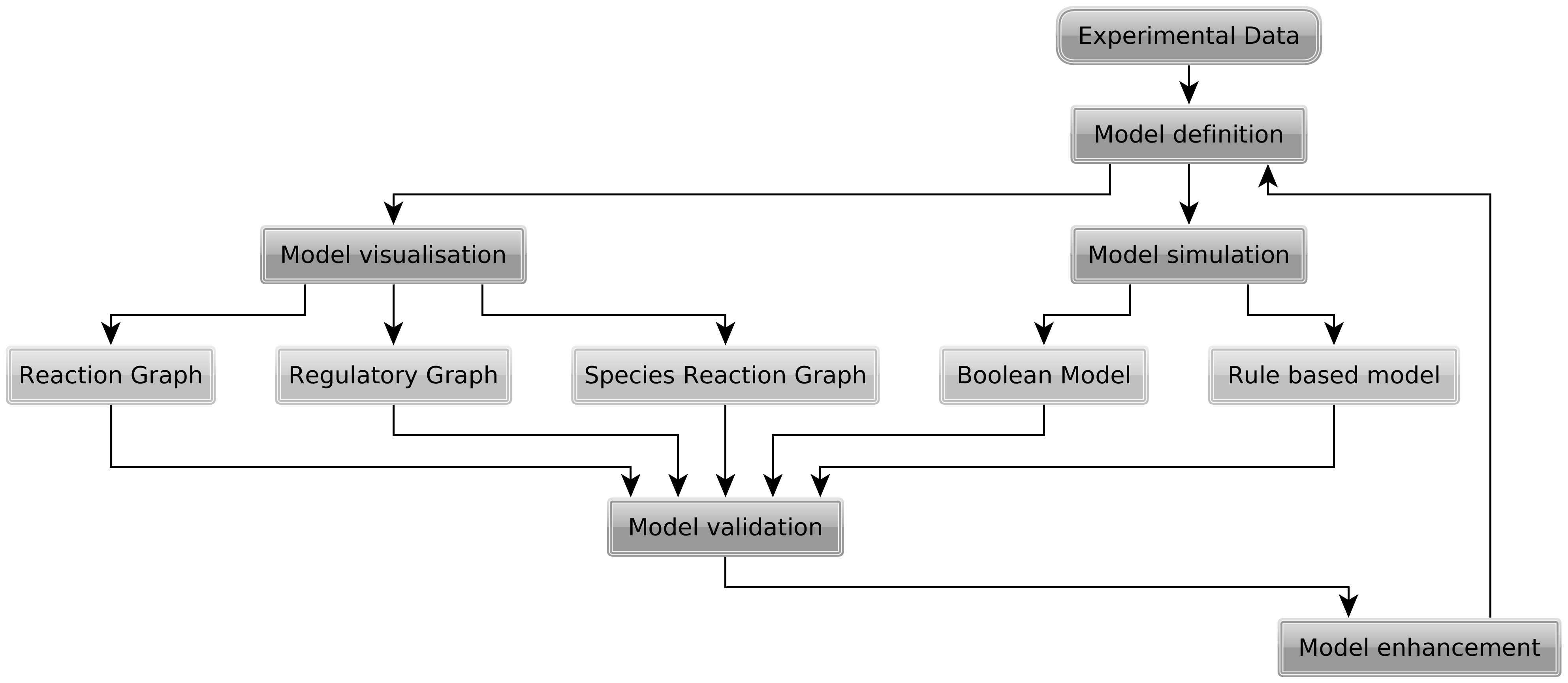
rxncon is an application to generate contingency matrices as well as graphical representations of biochemical signaling networks. As its input it uses specially formatted Excel files.

Open positions:

Two PhD student positions

One PostDoc positions

The application deadline has been set to May, 18th, with possible start from June. See http://rumo.biologie.hu-berlin.de/rxncon_static/open_positions.pdf for more details.

Using rxncon

To start using rxncon you first have to upload a specially formated Excel file (only .xls is supported not .xlsx!). You can find an example/template file in the file list on this site (Example.xls).

Creating Biographer Graphs

If you have a local copy of rxncon running you must configure the Biographer URL. This can be
  • Online version of Biographer:
    Biographer Url: http://biographer.biologie.hu-berlin.de/
  • Local versioin of Biographer:
    Biographer Url: http://127.0.0.1:8000/biographer/
    The name of the application is "biographer" in this case but it depends on the name you installed the biographer web2py application under.

Creating Cytoscape Graphs

Make sure you have Cytoscpe running with the RPC plugin activated (insturction see here). By pressing one of the buttons in the graph menu a graph will automatically be created in Cytoscape. To style the graph import the following Cytoscape properties file: rxncon_cytoscape.props. The following layout correspond to each graph type:
Full Reaction Graph -> YM: Reaction graph
Condensed Reaction Graph -> YM: Reaction graph
Regulatory Graph -> YM: Regulatory graph

Creating SBML files and SBGN-PD graphs

To create SBML files and SBGN-PD graphs you need to install BioNetGen on your computer. Ubuntu/Debian users can use the SB.OS repository to install BioNetGen.
After you have installed BioNetGen you need to configure rxncon to find Perl and the BioNetGen script BNG2.pl.
  • Windows example:
    Perl Path: C:\Perl64\bin\perl.exe
    Bionetgen Path: C:\Program Files (x86)\BioNetGen\BNG2.pl
  • Linux example:
    Perl Path: /usr/bin/perl
    Bionetgen Path: /usr/share/bionetgen/Perl2/BNG2.pl

This is the online and distribution version of rxncon. To get the full functionality of rxncon you will need to download this application and use it as a desktop applications.

Installing rxncon

To install rxncon on your computer go to the download page and get the latest release for your operating system. After you have downloaded the release upack it.

  1. Start the web2py server
    • On Windows you will find a rxncon.bat file and a folder called "web2py". Double click the rxncon.bat file.
    • On Linux make sure that you have Python >=2.5 installed. You will find a rxncon.sh file that you can execute
    • On Mac OsX we had not time to test it yet, sorry :/ Most likely you will need to install the rxncon web2py OS-X package as an application and start web2py from the menu.
  2. Choose a password
    • If you see a user interface like in the picture below you can type any password (it will not be stored and is only valid for this session) and press "start server".
      web2py server start gui
      You Broswer will automatically open and start the rxncon application
    • If you do not see this user interface you can type a password in the console window that opens. You then need to manually open the address that is displayed in your web browser. If you did not change anything it will be http://127.0.0.1:8000 (just click this link).
  3. On your first start you will be asked to create the an initial user. If you are working locally with rxncon you will not have to remember the password since you will be automatically logged in.
    You should now be able to use rxncon.

If you want to create graph images you need Cytoscape with a working XMLRPC plugin. Here is a walk through for the installation:

  1. Download Cytoscape from http://www.cytoscape.org/download.html
  2. Start Cytoscape
  3. Install the XMLRPC plugin by selecting: Plugins > Manage Plugins > Available for Install > Communication/Scripting > CytoscapeRPC 1.2
  4. Start the XMLRPC plugin by selecting: Plugins > Cytoscape RPC > Activate CytoscapeRPC > OK (default options are fine; XML-RPC, Port 9000)
    start cytoscape rpc

Updating rxncon

If there is a new version of rxncon available use the "update" link in the header menu. After you updated rxncon a restart might be required.
The update process will download a web2py application package (*.w2p) and overwrite your current web2py application. All your data will still be available and ready to use with the new rxncon version.
Some updates may require web2py to be updated. You can update the web2py server by going to http://127.0.0.1:8000/admin/default/site and using the "update now" button.
web2py update button

Problems and Requests

If you have problems using rxncon or you want to request new features please use our tracker on sourceforge. In the footer of each page there is a link to our tracker. We appreciate every comment.

In addition to that you can directly contact the creators of rxncon

Marcus Krantz marcus.krantz@biologie.hu-berlin.de
Falko Krause
(for techiqual questions)
falko.krause@biologie.hu-berlin.de

Shoutbox

loading...
loading...